
Speculation Rules can make page-to-page navigations feel almost instant by allowing the browser to prepare the next page before the visitor actually clicks.
Depending on your configuration, Chrome can prefetch a document, prerender it, or use newer experimental strategies such as prerender_until_script. The amount of work done in advance depends on both the speculation type and its eagerness.
If you are new to the API, we already covered the fundamentals in our Speculation Rules webinar with Google.
The more interesting question for this article is:
How much faster do Speculation Rules make navigations for your actual visitors?
Synthetic testing alone is not ideal for answering that. Speculation Rules depend on real navigation behaviour, such as hovering, touching or clicking links. Real User Monitoring gives us a much better opportunity to compare those navigations at scale.
In this article, we will attach a label to every speculative navigation, carry that label through the HTTP request and response, and finally report it to RUMvision.
That allows us to compare results such as:
- regular navigations
prefetch+conservativeprefetch+moderateprerender_until_script+conservative- any other strategy you want to experiment with
These values describe the Speculation Rule that was involved, not necessarily the navigation type that the browser ultimately produced.
Identify which Speculation Rule triggered the navigation
Before measuring performance, we first need to know which Speculation Rule was involved in each navigation.
Add a tag to your Speculation Rules
Speculation Rules support a tag field. Chrome sends that value to the destination server in the Sec-Speculation-Tags request header. Chrome added support for this tagging mechanism so servers can identify which rule was associated with a speculative request.
For example, when generating a rule for a conservative prefetch, we use a tag such as:
prefetch+conservative
For prerender_until_script, that might become:
prerender_until_script+conservative
The important part is not the exact naming convention. It is that the combination remains stable and descriptive enough to use as an experiment dimension later.
In our implementation, the tag is generated from the speculation type and eagerness:
tag: specType + '+' + eagerness
You can find the complete implementation on GitHub, including a sampling script and prerender_until_script support, which is still in origin trial at time of writing.
For your convenience, I've created a Speculation Rules Builder over at RUMvision.com.
The builder supports different rule types and eagerness settings and is useful when you want to experiment without hand-writing the entire ruleset.
Why the tag matters for RUM
Without the tag, you may still be able to observe how the resulting navigation was handled, but you lose the experiment context that tells you which Speculation Rule initiated the work.
That becomes especially important once you start comparing things such as:
prefetch+conservative
prefetch+moderate
prerender_until_script+conservative
prerender_until_script+moderate
Storing only the eagerness would no longer tell you enough. The speculation type should remain part of the tag as well.
It also means you can change only one variable at a time and see how that affects your real users. For example, you can keep the speculation type identical and compare conservative against moderate.
Or you can keep the eagerness identical and compare prefetch against prerender_until_script. We used exactly this approach while testing newer Speculation Rules settings and their impact on TTFB.
Why also sending the speculation type is important
A speculation tag describes the rule that was triggered, but that does not necessarily tell you how far the browser actually got before the navigation started.
For example, a page may have been selected by a prerender_until_script rule, while the resulting navigation is later observed as a prerender, a navigational prefetch, or even a regular navigation.
That distinction matters when analysing the performance impact.
In our own RUM data, we filtered navigations that were tagged as coming from a prerender_until_script experiment. On desktop at P80, those navigations did not all end up in the same navigation category:
prerender: 344 ms, 82.00%indirect: 440 ms, 8.71%navigational_prefetch: 668 ms, 5.76%back_forward: 386 ms, 2.07%navigate: 592 ms, 1.47%
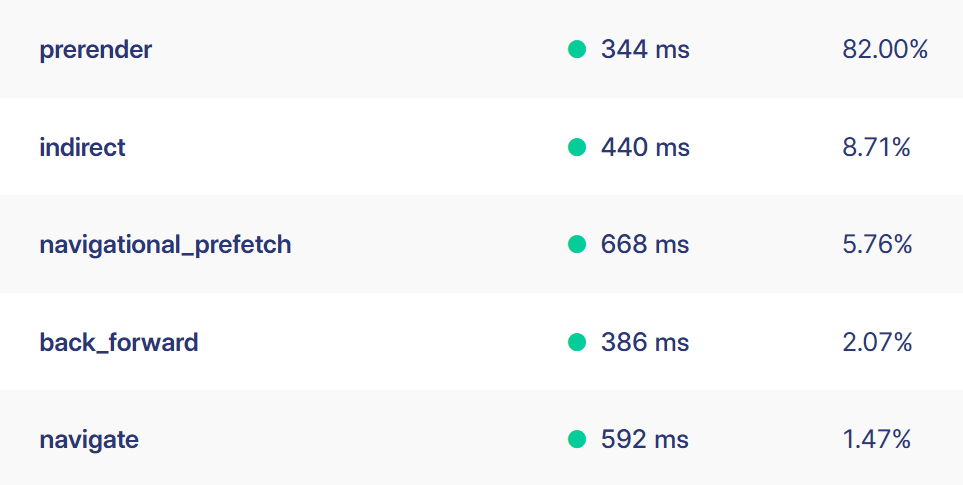
This shows why the experiment tag and the observed navigation type answer two different questions.
The speculation tag tells us:
- Which rule did we ask the browser to use?
The navigation data tells us:
- What kind of navigation did we actually observe?
A prerender_until_script rule can therefore still be valuable even when the navigation does not show up as a full prerender. The browser may have started speculative work, but the visitor could navigate before that work progressed far enough to become a completed prerender.
That is also why I would include the speculation type in the tag instead of only storing the eagerness.
For example:
prerender_until_script+conservative
is much more useful than:
conservative
With the first value, you retain the intended strategy and can compare it with the navigation type that RUM observed afterwards.
This gives you two separate dimensions:
Requested speculation strategy:
prerender_until_script+conservative

Observed navigation type:
prerender
or, for another visitor:
Requested speculation strategy:
prerender_until_script+conservative

Observed navigation type:
navigational_prefetch
That difference is valuable rather than noise. It shows how the same requested speculation strategy can result in different navigation outcomes by the time the user navigates.
Pass the speculation tag through the server
The browser now knows which Speculation Rule was involved, and the destination server receives that information. The next challenge is making it available to client-side RUM after the navigation has completed.
Read Sec-Speculation-Tags on the server
A tagged speculative request contains a header similar to:
Sec-Speculation-Tags: "prefetch+conservative"
The HTML specification defines Sec-Speculation-Tags as a structured HTTP request header containing the developer-provided tags associated with a speculative navigation. A request can technically contain multiple tags when more than one rule applies.
On a PHP server, this request header is available through:
$_SERVER['HTTP_SEC_SPECULATION_TAGS']
Our implementation reads the value, sanitizes it, and falls back to none when the header is absent. Because this value ultimately originates from an HTTP request, it should be treated as untrusted input.
Return the tag using Server-Timing
Once the server has read the speculation tag, we expose it again to the browser using a Server-Timing response header.
For example:
Server-Timing: speculation;desc="prefetch+conservative"
This is a convenient bridge between the incoming HTTP request and the Performance API in the destination document. See the PHP Server-Timing implementation on GitHub.
Platforms
Some platforms are already doing this out of the box. Although undocumented, Shopify is exposing some information regarding the eagerness level that was used. When using Shopify and RUMvision, this is already collected for you without needing to enable anything.
At time of writing, a Speculation Rules tracking implementation for Hyva + RUMvision is on its way too.
Read the speculation strategy on the next page
At this point, the browser has completed the navigation and the response tells us which Speculation Rule was involved.
RUMvision supports collecting data from Server-Timing directly. However, for Back Forward navigations, that would result in bfcaches potentially being misreported with the same Sec-Speculation-Tags information.
So, we're better off using JavaScript here.
Read the Server-Timing description
Server-Timing metrics are exposed to JavaScript through the serverTiming property of navigation and resource performance entries. The desc value becomes PerformanceServerTiming.description.
There is one useful architectural detail here: we are not actually measuring a server-side duration with this entry, but just using Server-Timing as a small piece of metadata:
name: speculation
description: prefetch+conservative
Knowing that, we can retrieve that information from the Navigation Timing entry:
performance
.getEntriesByType('navigation')[0]
?.serverTiming
.find(entry => entry.name === 'speculation')
?.description
For a speculative navigation, this can return:
prefetch+conservative
For another experiment it could return:
prerender_until_script+conservative
The back/forward cache caveat
Our implementation listens for the pageshow event:
addEventListener('pageshow', (event) => {
// ...
});
This matters because not every displayed page represents a fresh network navigation.
In case of event.persisted === true, the page was restored from the back/forward cache, or bfcache. In that situation, we do not want to accidentally attribute an old Server-Timing value to the current page restoration.
So our implementation only retrieves the speculation tag for non-bfcache navigations:
if (!event.persisted) {
// Read speculation information
}
For bfcache restores, we keep the value as none.
This keeps the experiment dimension focused on the navigation that actually produced the document response.
Send the result to your RUM
Once we have the tag in JavaScript, we can attach it to the RUM data for that pageview.
Report it as an A/B testing dimension
In RUMvision, we send the speculation strategy into the speculation_tags dimension:
rumv('dimension', 'speculation_tags', speculationTag); The complete flow therefore looks like this:
- Speculation Rule
- tag: "prefetch+conservative"
- Sec-Speculation-Tags request header
- PHP
- Server-Timing: speculation;desc="prefetch+conservative"
- PerformanceNavigationTiming.serverTiming
- RUMvision experiment dimension
This turns each actual pageview into an experiment sample. The pageview itself carries the strategy that was involved, which you can then compare with the observed navigation type and its performance.
Check out the exact script to send data to RUMvision via this github link. A few sites have already implemented this for A/B testing purposes.
When using RUMvision
When using RUMvision, it is still important to include the speculation type in your tag. RUMvision's navigation type dimension tells you how the resulting navigation was ultimately handled, while the speculation tag tells you which strategy the browser was asked to use. Keeping both dimensions allows you to compare the requested strategy, such as prerender_until_script+conservative, with the navigation type that was actually observed.
Group your metrics by Speculation Rules action
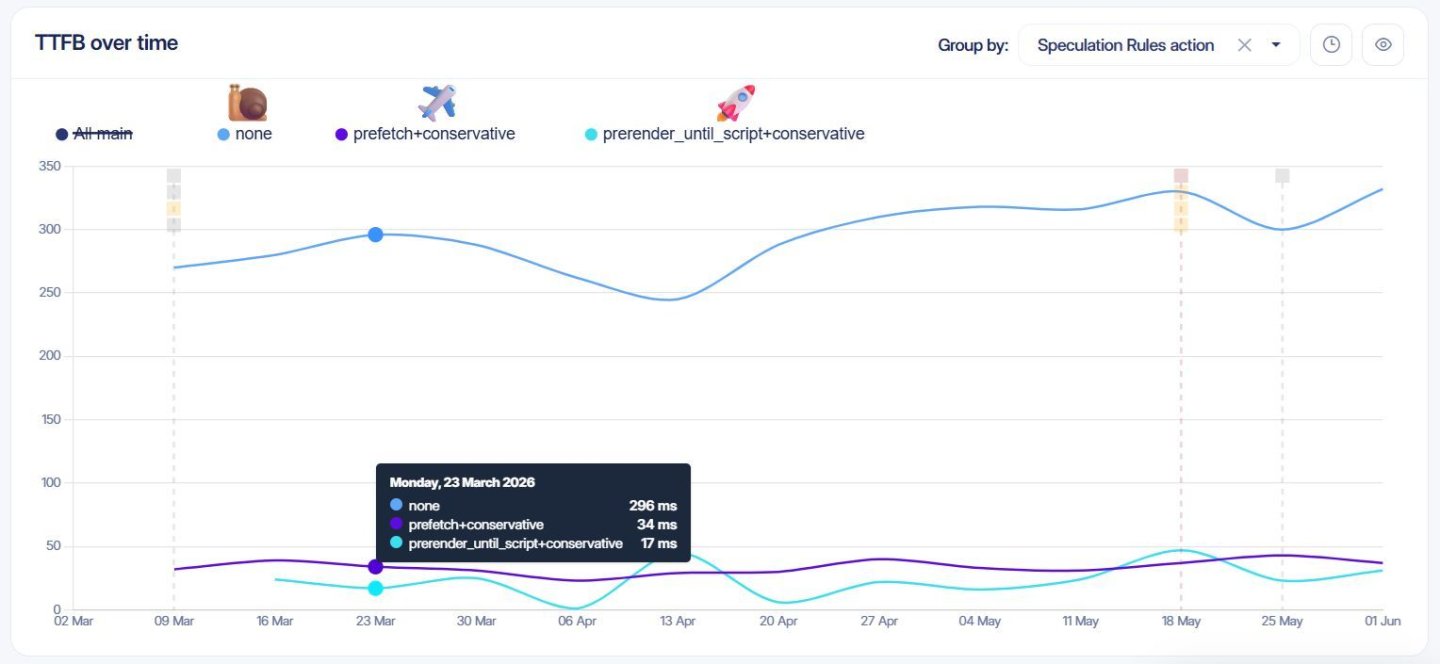
Once the experiment dimension reaches RUMvision, you can use it as a group-by dimension. For example, TTFB can be filtered and viewed by navigation type and your new speculation tags dimension. Cross match and compare different strategies and plot them in a timeline chart to see the differences over time.
That gives you a direct comparison between normal navigations and the Speculation Rules strategies and eagerness levels used on real visits.
Experienced vs real TTFB
Do note that a 17 ms TTFB does not mean the origin suddenly generated the page in 17 ms. The speculative request simply received a head start.
By the time the visitor initiated the navigation, much of the network work had already happened. From the perspective of the actual navigation, the response therefore becomes available extremely quickly.
That is precisely the experience Speculation Rules are designed to improve.
Compare eagerness settings
This is where RUM becomes useful for comparing different eagerness settings:
prefetch+conservative
prefetch+moderate
or:
prerender_until_script+conservative
prerender_until_script+moderate
A more eager strategy can give the browser more lead time, but it can also increase the number of speculative requests that are never used. That is exactly the kind of trade-off that is hard to judge from a single lab run.
Summary
Implementing Speculation Rules is only the first step. Knowing that the browser can prefetch a page does not tell you how much faster real navigations became.
By adding a tag to your speculation rule, carrying that tag through Sec-Speculation-Tags and Server-Timing, and reporting it as a RUMvision dimension, you can connect the browser's speculative loading decision directly to real-user performance.
All (github) links
The implementation consists of three or four relatively small pieces:
- Add a descriptive tag to the Speculation Rule.
- Adjust the Speculation Rules using the RUMvision builder.
- Read
Sec-Speculation-Tagsserver-side and return it throughServer-Timing. - Read the resulting
PerformanceServerTimingentry and report it to RUMvision.
The individual pieces are simple. The useful part is connecting them.
Once that is done, prefetch, prerender_until_script, different eagerness settings and future experiments become visible in the same RUM dataset as your actual TTFB.