I like the new Speculation Rules API which allows sites to prerender (potential) next navigations. But I'm not a fan of third parties loading right away.
I like the new Speculation Rules API, which allows sites to prerender potential next navigations. But I'm not a fan of third parties loading right away.
The Speculation Rules API is not brand new, but it can certainly be a game-changer for web performance, and multiple platforms have implemented it already.
In short: the API lets us instruct the browser to prerender possible next pages in the background, making the actual navigation feel instantaneous. By using nothing more than a JSON rules file.
I recently implemented this on a website, and the speed improvements can be impressive. However, I quickly ran into a significant "gotcha" that I want to share: handling third-party scripts.
The problem: background execution
When a page is prerendered, the browser effectively loads it in a hidden background tab. It fetches the HTML, parses the CSS, and even executes the JavaScript.
If you load third-party scripts (like Google Tag Manager, Clarity, or ads/tracking pixels) immediately on page load, they will fire while the page is still in the background.
The good
Some third-party vendors are already familiar with the implications of Speculation Rules and have updated their scripts accordingly. Google Analytics is one of them.
Some analytics providers (such as Google Analytics) and ad providers (such as Google Publisher Tag) support speculation rules already and won't log views until the page is activated.
Barry Pollard, a Web Performance Developer Advocate at Google, chimed in when I posted about this on LinkedIn in July 2025. It appeared that some analytics vendors had this on their roadmap, taking into account both Speculation Rules (overreporting) and BFCache (underreporting) edge cases.
This means your data should not end up overreporting pageviews as a result of prerendered pages that visitors never actually navigate to.
The bad
But many third parties still aren't prerender-aware. And despite being a well-known vendor with (presumably) many developers, Clarity is still one of them. This becomes clear when debugging Speculation Rules with DevTools:

This leads to two major issues:
- Polluted data: Your analytics may record pageviews for pages that the user never actually visited. Even when they do visit, the timestamps and session flow may be off.
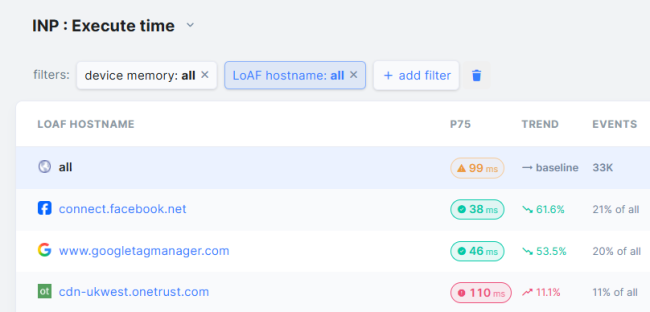
- Performance hits (INP): Third-party scripts initializing during prerender add unnecessary CPU load to the current page, potentially harming your Interaction to Next Paint (INP) score.
The solution: delay until activation
The fix is simple: ensure that heavy scripts and tracking tags only fire when the page is activated. So, when the user actually clicks the link and the prerendered page is promoted into the foreground.
The Speculation Rules API provides the property document.prerendering and the event prerenderingchange, which help handle this scenario.
The code
The developer.chrome.com docs include several examples, though I only saw them after coming up with my own script that I shared on LinkedIn. I tailored it a bit for this article and is now as follows:

This code wraps your tracking initialization (such as GTM) in a prerender check.
If the document is not in the prerendering state, GTM loads normally.
If it is prerendering, we dynamically inject GTM once the page transitions from prerender to active.
Although the example uses Google Tag Manager, the same principle applies to any other tag manager. Just tailor the code to your needs, or even apply it to JS widgets and APIs (either 1st party or 3rd party) that aren't critical.
Why this works
Instead of fixing this issue on a per-vendor basis (which would be nearly impossible) you fix it for all third parties at once. You may still need special handling for third-party scripts that are hardcoded outside of your tag manager, but this approach covers the majority of cases.
This results in:
- Accurate analytics: "Page view" events only fire when a real user actually views the page.
- Better performance: Deferring script execution keeps the main thread free during prerender, avoiding unnecessary work that could hurt INP on the current page.
Seeing it in action
We've already rolled out an extended version of this script on the RUMvision website. It ensures our analytics remain accurate and helps keep our INP score in great shape.
In our implementation, we take it a step further by pushing the navigation/pageview type (prerender vs. normal) into the dataLayer, which lets us compare instant-load performance vs. standard navigation within our dashboard.
Browser support
As with any browser API, it's important to understand current support.
At the time of writing, the Speculation Rules API is supported in Chromium-based browsers, including Chrome, Edge, Opera, Brave, and others.
The good news is that the API has been submitted to Interop 2026, alongside other key web performance features, which is a promising sign for broader, cross-browser adoption.